 C4GG
C4GGSearch
Search across all content
C4GGSearch across all content
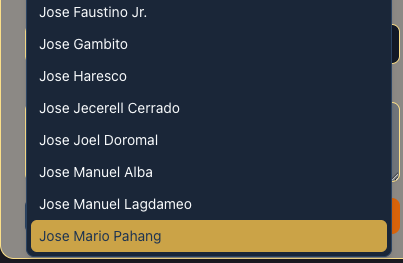
The data on the Related Official dropdown box displays names up to those that starts with J.
1. Select an official 2. Go to Dynasty Check and click Suggest button. 3. On the Suggest Dynasty Connection select Related Official and scroll all the way down to the bottom of the list.
User should expect to see names beyond those that starts with J.
The dropdown list stops at names starting with J.
Browser: Mozilla/5.0 (Macintosh; Intel Mac OS X 10_15_7) AppleWebKit/537.36 (KHTML, like Gecko) Chrome/145.0.0.0 Safari/537.36
Device: MacIntel | 1920x1080
Please sign in to leave a comment
7 months ago